See the difference
Before / After
Drag the slider. This is what Arc Raiders looks like in dark areas — and what it looks like with BrightRaider.
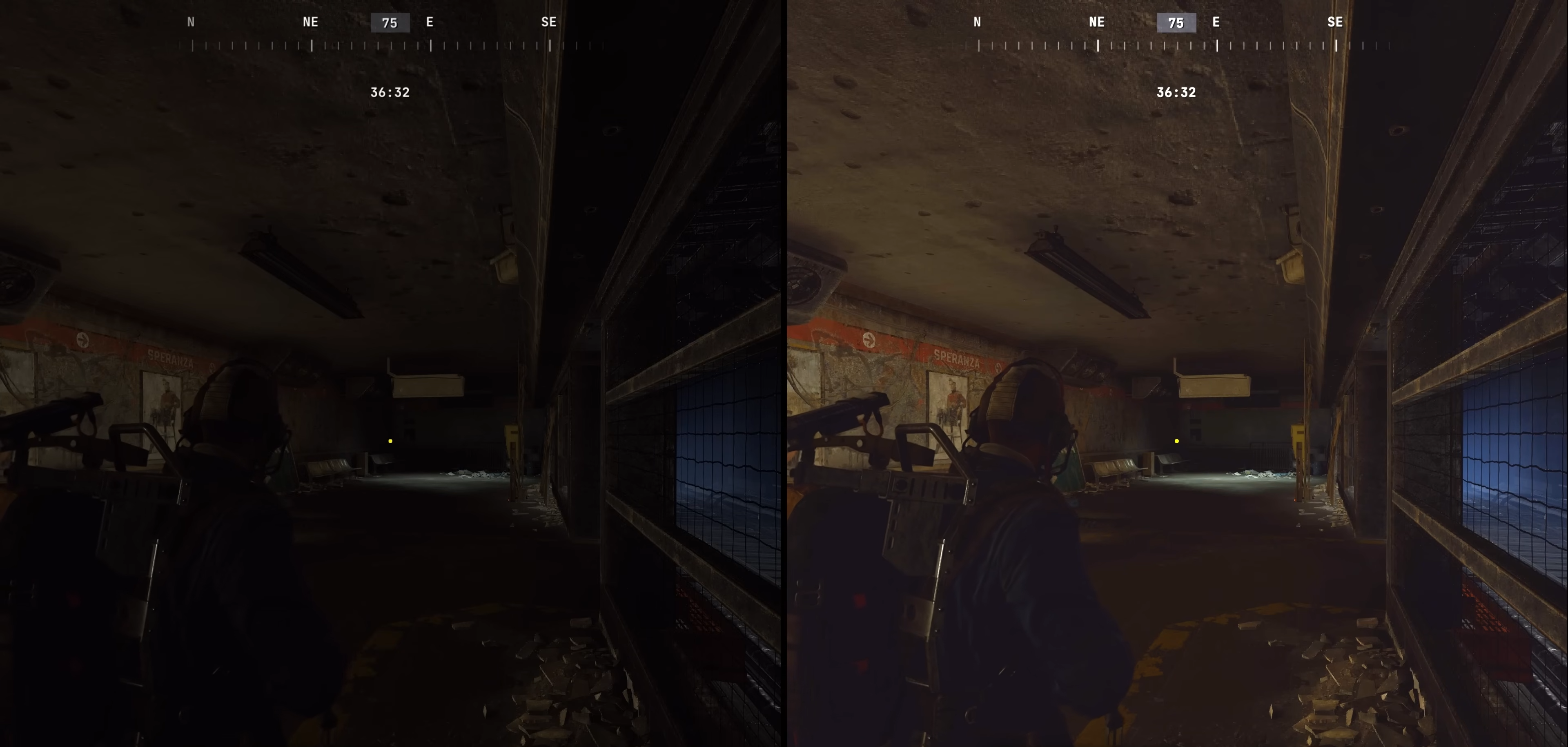
Screenshots by Jags95 — thank you!
No brightness slider. A quick-select wheel built for controllers. No evac timer overlay. No way to mute just the game. BrightRaider adds everything PC players are missing — without touching a single game file.
Drag the slider. This is what Arc Raiders looks like in dark areas — and what it looks like with BrightRaider.
Screenshots by Jags95 — thank you!
Lightweight, native Windows UI. Sits in your system tray and stays out of your way.

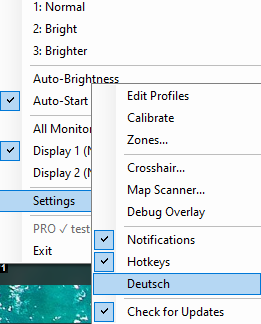
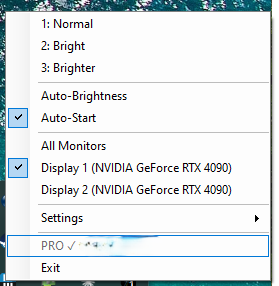

No installation. No game modification. Just display settings — like your monitor OSD, but instant.
Double-click. A tray icon appears. Nothing installed, nothing in startup unless you want it. One ~26 MB EXE — no .NET runtime needed.
Instant profile switch. Works in fullscreen, in-game, during a raid. No alt-tab, no OSD delay.
Dark tunnels, night raids, Buried City — enemies that were invisible are now readable. Press Numpad 1 to reset for bright outdoor areas.
Walk into a dark cave — brightness goes up automatically. Step outside — back to normal. No keypress, no looking away. Calibrated in two clicks, runs silently in the background.
One keypress drags an item from your inventory straight to your Safe Pocket — or back. Handles everything: open inventory → drag → close. 5 presets, configurable slots, toggle direction per preset. Never fumble the Safe Pocket under pressure again.
The quick-select wheel was designed for a controller thumbstick. QuickSelect makes it work like a PC player would expect — one key, item used, hand freed. 8 independent slots, per-slot LMB hold time in milliseconds, Q and H keys freely rebindable.
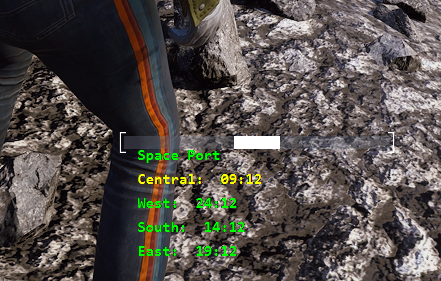
Hold M on the map — BrightRaider reads all evac timers instantly on your PC, no game files touched. Live color-coded countdown overlay. Detects all current map conditions and adjusts evac points automatically. Supports Buried City, Stella Montis, Space Port, Blue Gate, Damm, Riven Tides and Pendola Pass.
Press F5 with the stash open — BrightRaider reads your whole stash, then scraps or sells what your rules say. By default nothing happens until you confirm the list, and anything it cannot name with confidence is left alone. Starts in test mode. Every resolution from 1080p to 5K.
CapsLock holds W for you — sprint or walk. Hold CapsLock 600ms for Tap Mode: pulses W at intervals for the Looting Mk.3 Survivor augment. Shift toggles sprint, C triggers a slide. Loot with both hands on the mouse. Fully rebindable, with its own sprint key and timing per game.
A persistent crosshair, always centered, click-through so it never gets in the way. 6 styles: Cross, Dot+Ring, T-Shape, Dot, Ring, Cross-with-gap. Optional outline for bright backgrounds. EAC-safe — same mechanism as Discord and GeForce overlays.
Watch something on your second screen, mute Arc Raiders with one key — Discord and music stay on. In a tense situation? Long-press to duck the game to 20% instead. One more key mutes Discord or TeamSpeak while you play.
Real comments from the GitHub community — unedited.
Currently using pro and it helps me so much in game! Just need help on how to number the quick use items.
i just searched far and wide for my login info to request this feature but ur too fast. got pro after reading through the additions u made on the 9.5 update and icl ur cooking with these features
First, thanks for fixing the 4:3 mapscan issue — I can confirm it's working! I love this new QuickSelect feature. Amazing work on V9.5, and looking forward to V1.0!
' data-de='Funktioniert perfekt, danke! Hoffe der Map Scanner ist nicht bannable, denn es ist wirklich eine Lebensqualitäts-Verbesserung'>Works perfectly, thanks! Hopefully the map isn't bannable as I feel it is a quality of life improvement
work like a charm now, thanks for the amazing tool !
BrightRaider adjusts your display output — the same as changing your monitor brightness or using NVIDIA Control Panel. Nothing is read from the game, nothing is written to game memory, nothing is injected.
Still unsure? Scan the build on VirusTotal — only a couple of the ~68 engines flag it heuristically. Microsoft analysed this exact build on 11 Aug 2026 and reported no positive detection.
Free is fully functional. Pro adds automatic brightness switching, QuickSelect, Map Scanner, and more — so you never take your hand off the mouse.
Works in fullscreen. NumLock on or off. No numpad? Pick TKL / Laptop in the setup wizard (Settings → App → Re-run setup wizard) — the arrow keys take over.
5,000+ players already see the difference. One EXE, zero install, no .NET runtime.